It’s 2026, and the way we work, create, and live has undergone a revolution. Artificial intelligence is no longer a distant concept or a luxury for tech giants – it’s here, it’s practical, and it’s transforming everyday life. If you’re still relying on manual workflows, tedious routines, or outdated tools, you’re not just slowing down – you’re missing a golden opportunity to supercharge your productivity, creativity, and impact.
The best part? You don’t need deep pockets or corporate budgets to harness this power. Today’s AI landscape is bursting with free, high-quality tools that deliver results previously reserved for specialists. From automating repetitive tasks to sparking fresh ideas and streamlining decision-making, these platforms are leveling the playing field for professionals, creators, and innovators alike.
At Techwise Tips, our mission is simple: to empower you with smart, actionable knowledge. We’ve scoured the AI universe, tested countless platforms, and handpicked the tools that truly matter – the ones that make a tangible difference in your workflow, your projects, and your life. No hype, no fluff – just practical, cutting-edge AI you can start using today.
Whether you’re looking to supercharge productivity, unleash your creativity, or stay ahead in a fast-moving world, this is your roadmap. Get ready to explore the best free AI tools of 2026 – and unlock possibilities you didn’t even know existed.
The future is here. And it’s free. Are you ready to dive in?
1. AI for Intelligent Writing & Communication: Claude 4.0 (claude.ai)
In 2026, AI writers have moved beyond simple text generation. They understand context, nuance, and even the subtle art of tone. Our top pick for free writing assistance is Claude 4.0.
Why it’s essential: Claude 4.0’s free tier offers an astonishing level of sophistication. It excels at complex analytical tasks, generating long-form content, summarizing intricate documents, and even helping you brainstorm creative ideas with a human-like conversational flow. Its advanced reasoning capabilities make it ideal for drafting reports, crafting compelling marketing copy, or even refining academic papers without sounding generic.

How to use it:
Brainstorming and ideation: Use it as a creative partner to explore new angles for your projects.
Drafting long-form content: Give it a topic and key points; watch it produce structured, coherent articles.
Summarizing complex information: Upload lengthy documents or paste text to get concise, actionable summaries.
Key Features (Free Tier): Advanced reasoning, longer context window, superior factual recall, nuanced tone generation.
Link: claude.ai
2. AI for Unleashing Creativity: Adobe Firefly (firefly.adobe.com)
For designers, marketers, and anyone needing stunning visuals, Adobe Firefly has become a game-changer in 2026. Its integration with the Adobe ecosystem sets it apart, offering unparalleled control and quality in AI-generated art.
Why it’s essential: Firefly’s free tier provides access to powerful text-to-image generation, text effects, and generative recoloring. What makes it stand out is its commitment to ethically sourced training data, ensuring commercially safe outputs. This means you can create high-resolution images, unique graphics, and explore design concepts without worrying about intellectual property issues.
How to use it:
- Generate unique visuals: Describe any image you need, from product mockups to abstract art.
- Create custom text effects: Elevate your headlines and social media posts with unique text styles.
- Experiment with design iterations: Rapidly test different color palettes and design variations for logos or web elements.
Key Features (Free Tier): Text-to-image, generative fill, text effects, generative recolor, commercially safe assets.
Link: firefly.adobe.com
3. AI for Supercharged Productivity: Notion AI (notion.so/product/ai)
For teams and individuals alike, Notion AI in 2026 is no longer just a helpful assistant; it’s an indispensable component of the ultimate productivity workspace. Its seamless integration into your knowledge base makes it a game-changer.
Why it’s essential: The free tier of Notion AI offers powerful capabilities directly within your existing Notion pages. It can summarize meeting notes, draft marketing copy,refine your project plans, and even generate ideas for blog posts, all while working with the information already stored in your Notion workspace.

This contextual awareness means less copy-pasting and more actual work getting done.
How to use it:
- Summarize documents: Highlight text in any Notion page and have AI distill the key points.
- Generate action items: Transform raw meeting notes into structured tasks.
- Draft content instantly: From job descriptions to social media posts, let AI kickstart your writing.
Key Features (Free Tier): Summarize, brainstorm, translate, content generation, action item extraction within Notion.
Link: notion.so/product/ai
4. AI for Intelligent Automation: Zapier Central (zapier.com/central)
The promise of AI-driven automation has truly arrived in 2026 with tools like Zapier Central. While currently in beta, its free access offers a glimpse into a future where mundane tasks simply disappear.
Why it’s essential: Zapier Central allows you to build “AI agents” that monitor your apps and proactively handle tasks without manual intervention. Think of it as a smart assistant that learns your habits and workflows across thousands of applications. This moves beyond simple if-then automations to intelligent, decision-making processes. Imagine an AI agent automatically sorting emails, populating spreadsheets, or even drafting responses based on context.
How to use it:
- Build custom AI agents: Create agents to manage specific workflows, like lead qualification or content distribution.
- Automate repetitive tasks: Let AI handle data entry, email triage, and notifications across your connected apps.
- Integrate diverse tools: Connect over 8,000 apps to create a truly seamless digital ecosystem.
Key Features (Free Beta): AI agent creation, multi-app automation, natural language instruction for automation, proactive task management.
Link: zapier.com/central
5. AI for Accelerated Learning: NotebookLM (notebooklm.google.com)
Learning has never been more personalized and efficient than with NotebookLM. This innovative tool leverages AI to transform how you interact with information.
Why it’s essential: NotebookLM acts as your AI research assistant. Upload PDFs, Google Docs, even transcripts of YouTube videos, and it creates a summary, extracts key concepts, and generates an interactive, conversational AI that can answer questions based only on your uploaded sources. This prevents hallucinations and provides a focused learning experience, making it perfect for students, researchers, or anyone trying to master a new topic.
How to use it:
- Create smart study guides: Upload textbooks or lecture notes for instant summaries and quizzes.
- Research specific topics: Feed it a collection of articles and ask detailed questions.
- Generate new insights: Discover connections and themes across multiple documents that you might have missed.
Key Features (Free Tier): Source-grounded AI chat, automatic summaries, key concept extraction, interactive Q&A.
Link: notebooklm.google.com
Your Free AI-Powered Future Starts Now
The landscape of artificial intelligence is evolving at lightning speed, but one thing remains constant: the most impactful tools are those that empower you. In 2026, the free AI tools listed above are not just novelties; they are essential components of a modern, efficient, and highly creative workflow.
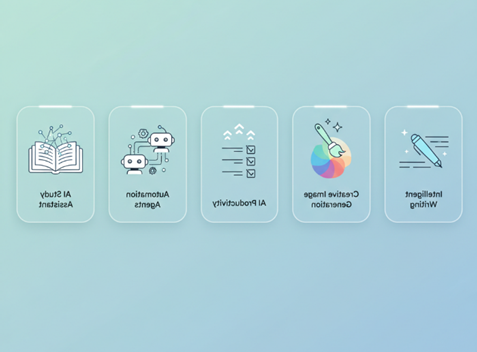
From drafting eloquent prose with Claude 4.0 to generating stunning visuals with Adobe Firefly, streamlining your projects with Notion AI, automating your daily grind with Zapier Central, and mastering new subjects with NotebookLM, the power is literally at your fingertips.
Don’t let the complexity of AI intimidate you. Start experimenting with these free tools today and witness firsthand how they can elevate your work, boost your productivity, and unlock a truly limitless potential.
What are your favorite free AI tools for 2026? Share your thoughts in the comments below!
Q1: What are the primary search triggers for “Free AI Tools” in 2026?
Answer: Users are moving away from broad “what is” searches toward intent-based utility. High-volume triggers include:
- Agentic Search: “Free AI to do [X] for me” (e.g., “Free AI to organize my Gmail” or “Free AI to book my appointments”).
- Comparison Queries: “Claude 4 vs GPT-4o free tier” or “Perplexity vs Google AI Mode.”
- Format-Specific: “Free AI video generator no watermark” or “Free AI to turn PDF into podcast.”
Q2: Which high-growth niches should ‘Techwise Tips’ prioritize?
Answer: To capture untapped traffic, focus on these “Micro-Niches”:
- The “Vibe-Coding” Niche: Tools for non-developers to build apps (e.g., Lovable, Bolt, Cursor).
- The “Privacy-First” Niche: AI that works locally or doesn’t train on data (e.g., DuckDuckGo AI, Andi Search).
- The “Small Business Automation” Niche: Free agents for e-commerce, such as Gemini for sales listings or Saner.AI for task management.
Q3: What are the biggest user pain points these tools must solve?
Answer: Addressing these specifically in your headings will improve your SEO “Helpful Content” score:
- Subscription Fatigue: Users want “Pro” features without the $20/month price tag.
- Hallucination/Trust: Users need verifiable sources (solved by Perplexity and NotebookLM).
- Technical Friction: Users want “No-Code” interfaces where they can speak naturally rather than using complex prompts.
Q4: Which emerging free tools will disrupt the market by late 2026?
Answer: Keep an eye on these “Challengers” for future review posts:
- Manus AI: A general-purpose autonomous agent that executes tasks instead of just chatting.
- DeepSeek: A powerful, open-source model that is quickly becoming the favorite for free coding and research.
- Wispr Flow: A voice-native AI that allows users to “dictate” their workflow across all apps on Windows and iOS.
- Genspark: An emerging research engine that generates custom “Sparkpages” for any query rather than a list of links.
Q5: How should content be structured for “Generative Engine Optimization” (GEO)?
Answer: Since AI engines (like Gemini or ChatGPT Search) now “read” your blog to answer user questions, use this structure:
- Direct Answer First: Place a 2-sentence summary of the “Best Tool” at the top of each section.
- Use Tables: AI engines love structured data. Always include a Tool | Best For | Link table.
- Cite Sources: Mention official developer names (e.g., “Anthropic’s Claude 4”) to build authority.